Front Office Kiosk & SAFE Alerts Guide
VSC Front Office Guide CC-AE-002 · Audio Enhancement EPIC Kiosk 2.0 · Rev 1.1 · Oct 2026
A full-page (8.5 × 11 in), two-sided guide to leave at the front-office EPIC kiosk after install. The front shows the home screen, the speaker-bar buttons, paging, building a group, intercom, answering a classroom call (Accept / Reject) and changing the bells for a day. The back is all about SAFE alerts: how staff send one (teacher mic, SAFE badge, wall or lockdown button), what the office sees, the three steps (Acknowledge, follow the district plan, End Event), paired vs non-paired alerts, escalated alerts, and quick fixes.
📄 View or download this guide as a PDF
Click the PDF icon below to open it right here in your browser. In the viewer, use Download (top right) to save a copy, or the printer icon to print it.
🎨 Branding it for a district
Same template as the Teacher Microphone Card: the top bar, accent color, logo and help line can match a district, and the red emergency band stays the same on every version. Send VSC Operations the district name, logo (PNG), colors and the help line staff should call. A sample in district colors is attached here.
👀 Preview
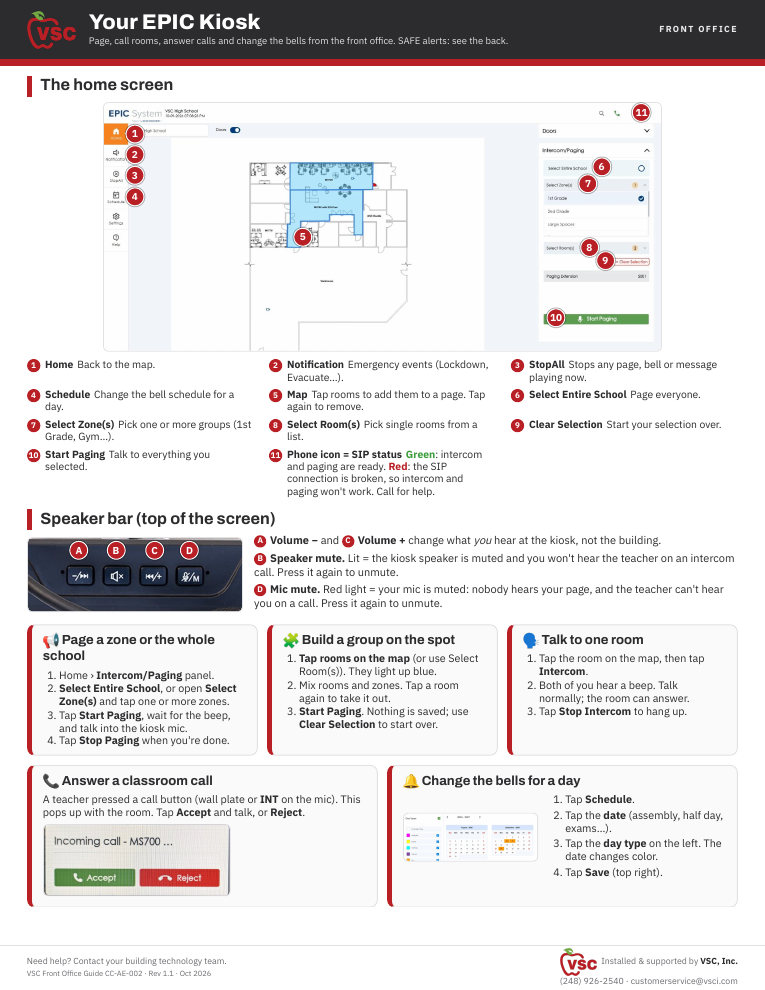
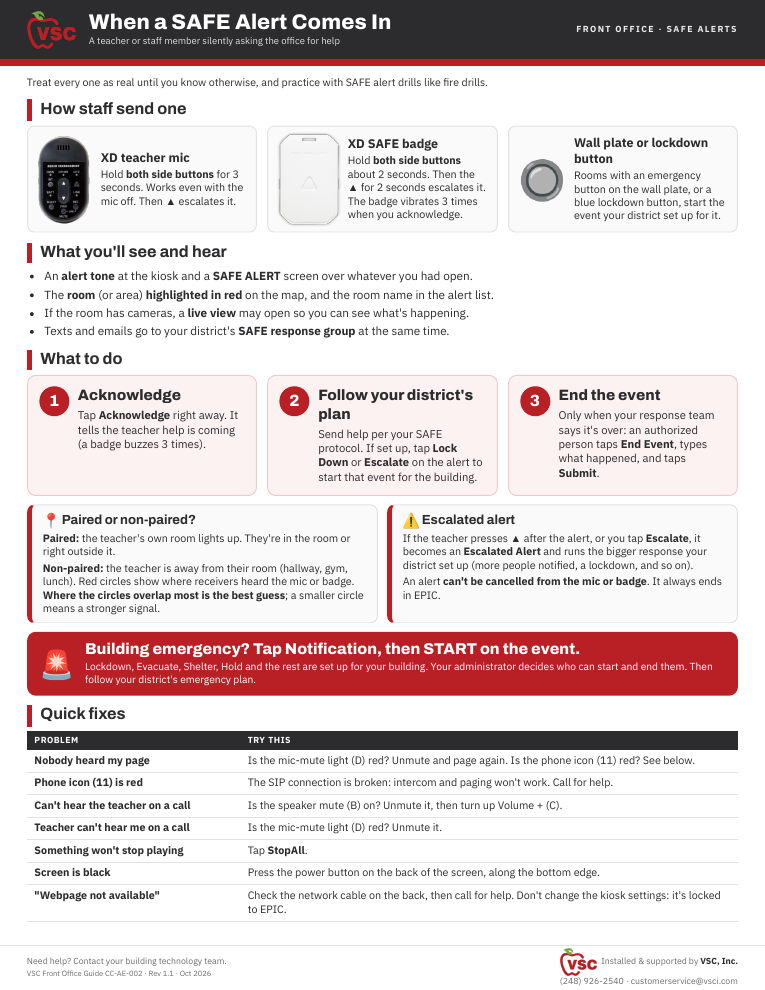
Front: home screen, speaker bar and how-tos. Back: SAFE alerts and quick fixes. Screenshots from VSC's EPIC 3.2.5 demo server (VSC High School).
📚 Sources & credits
- Card design and field notes: Brad Roy, VSC Director of Operations
- Audio Enhancement: EPIC System Kiosk 2.0 QSG DC-41220.1225 (speaker bar, power and home buttons); Kiosk 2.0 Spec Sheet DC-41219.1225; EPIC Quick Guide DC-41023.0723 (paging, dynamic paging, intercom: checked against EPIC 3.2.5); Single Day Bell Change QSG DC-40666.02 (checked against EPIC 3.2.5, which now needs Save); EPIC System SAFE Alert QSG DC-40672.02 (2018: acknowledge, paired / non-paired, End Event with comment; checked against the Safe Alert event on EPIC 3.2.5, which has Lock Down and Escalate buttons); XD SAFE Badge QSG DC-41208.1025 and SAFE Badge QSG DC-41184.0126 (side buttons, ▲ escalate, vibrate on acknowledge, alerts end only in EPIC); Suppress Bells During an Emergency Event DC-41226.1025 (StopAll). Speaker bar, mic and badge photos: Audio Enhancement. Incoming-call photo: VSC demo kiosk, 10/12/2026.
- Screen captures: VSC's EPIC 3.2.5 demo server, 10/9/2026; no pages, events or changes were made.