Add an XD Receiver to a CZA-1300 or MS-700-S
Quick Reference QR-AE-014 · Audio Enhancement EPIC · Rev 1.3 · Oct 2026
Wire, mount and set up an XD-0601 receiver so XD mics, SAFE alerts and mic volume work on an amp without a built-in receiver.
📄 View or download this guide as a PDF
Click the PDF icon below to open it right here in your browser. In the viewer, use Download (top right) to save a copy, or the printer icon to print it.
The MS-700 and MS-600 have an XD receiver built in. The MS-700-S and the CZA-1300 don't, so you add an external XD Receiver. Audio and 24 V power go over one cable. The receiver also has to talk to the amp over RS-232. That serial link is what carries SAFE alerts from the teacher mic, the mic's volume buttons and the link status. Without RS-232 the mics play, but SAFE alerts never reach EPIC.
| Amp | Audio + power | RS-232 (required) |
|---|---|---|
| MS-700-S | XD Receiver port (RJ45) › included splitter cable › RJ45 into the receiver's Audio/Power jack. | Carried on the same cable. The splitter's Phoenix lead lands on the receiver's control terminals. |
| CZA-1300 | XD port (RJ45) › CAT6 › receiver's Audio/Power jack. | Separate 3-wire run. The CZA's XD port has no serial pins. Wire the receiver's RS-232C terminal to the CZA-1300's RS-232 Phoenix (Gnd · TX · RX). |
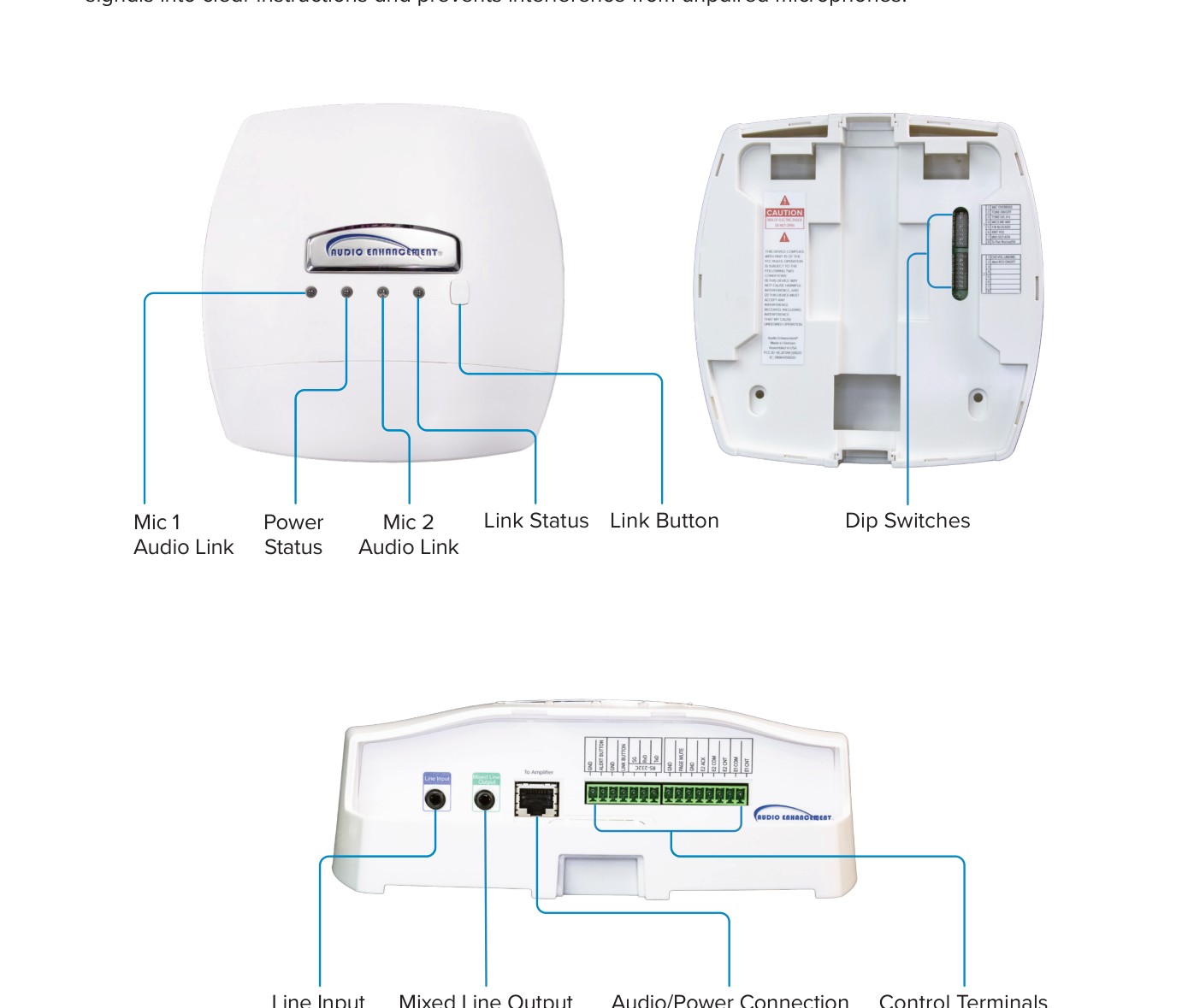
XD Receiver XD-0601: status LEDs and Link button on the front, DIP switches inside, Line In, Mixed Line Out, Audio/Power RJ45 and the control terminals on the bottom.
1️⃣ Mount the receiver
- Put it where every mic in the space can reach it: wall or ceiling tile, using the XD Receiver bracket. Route cables through the bracket's center hole or the wire molds.
- Keep it away from heat, moisture and big noise sources (motors, dimmers). In a gym, mount it high and central, not behind the bleachers.
- Hand-tighten the bracket screws. AE says not to use a drill or impact driver on them.
2️⃣ Wire it to an MS-700-S
- Run CAT6 from the MS-700-S XD Receiver port to the receiver.
- At the receiver, plug the CAT6 into the splitter cable that ships with the MS-700-S.
- Splitter RJ45 › receiver Audio/Power jack.
- Splitter Phoenix › receiver control terminals (RS-232 TX/RX and Link). This is the RS-232 link.
MS-700-S XD Receiver port: 1 NC · 2 RX · 3 Audio − · 4 +24 V · 5 GND · 6 Audio + · 7 TX · 8 Link.
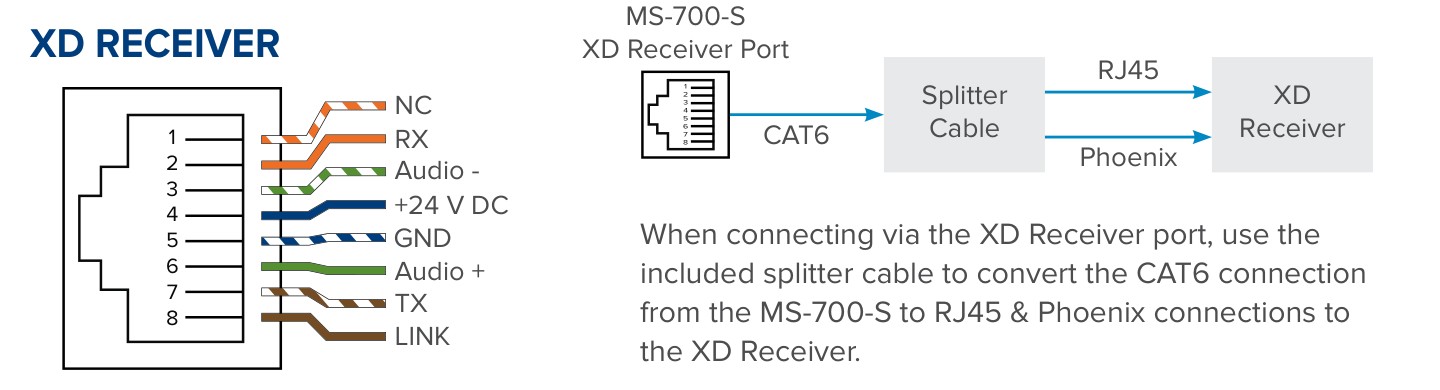
MS-700-S XD Receiver port and the splitter (AE DC-41151.1025).
3️⃣ Wire it to a CZA-1300
Audio and power: CAT6 from the CZA-1300 XD port to the receiver's Audio/Power jack. On the CZA's XD port, pins 3 and 6 carry the receiver's audio, 4 is +24 V and 5 is GND. Pins 1, 2, 7 and 8 aren't used, and the XD port has no RS-232. So the serial link needs its own path to the CZA's RS-232 Phoenix (pin 1 Gnd · pin 2 TX · pin 3 RX). Pick one:
| XD Receiver (RS-232C terminal) | CZA-1300 RS-232 Phoenix | |
|---|---|---|
| TxD (receiver talks) | → | Pin 3 · RX (CZA listens) |
| RxD (receiver listens) | ← | Pin 2 · TX (CZA talks) |
| GND | — | Pin 1 · Gnd |
Option A: separate 3-wire run (simplest)
- Run a 3-conductor cable (or a spare pair plus a drain) from the receiver's RS-232C terminal to the CZA-1300 RS-232 Phoenix, wired per the table above.
- Use this when the RS-232 run is short or a second cable is easy to pull.
Option B: use the spare pins in the XD CAT6 (one cable, VSC has used this on past projects)
- The XD cable's unused conductors (pins 1, 2, 7, 8) can carry the RS-232 between the rooms, but they must be broken out at both ends: the CZA's XD port and the receiver's Audio/Power jack don't connect those pins to the serial terminals.
- Suggested pinout (matches the MS-700-S XD Receiver port, so AE's MS-700-S splitter cable could do the breakout at the receiver end): pin 2 = to CZA RX, pin 7 = to CZA TX, ground on pin 5 (shared with the 24 V ground). Leave pins 3, 4, 5 and 6 straight through for audio and power.
- CZA end: use an RJ45 breakout (pass-through jack with screw terminals, or a short pigtail). Pins 3, 4, 5, 6 go on to the XD port; pins 2 and 7 (plus a ground) go to the RS-232 Phoenix: pin 2 › CZA pin 3 RX, pin 7 › CZA pin 2 TX, GND › CZA pin 1.
- Receiver end: the same breakout (or the MS-700-S splitter): pins 3, 4, 5, 6 to the Audio/Power jack; pin 2 to the receiver's TxD, pin 7 to RxD, ground to GND.
- Distance: RS-232 is specified for about 15 m (50 ft). At 9600 baud it usually runs much farther on CAT6, but test the full run, and use Option A or move the receiver closer if alerts drop out.
- Label both ends "XD + RS-232, do not plug into a network switch": this cable carries +24 V.
Check it with a meter
- With the receiver powered and the RS-232 wires disconnected, measure each serial wire to GND. The TX side of a working RS-232 port idles negative (typically −5 to −12 V). The RX side reads about 0 V.
- The wire that reads negative from the receiver goes to the CZA's RX (pin 3). The pin that reads negative on the CZA (pin 2, TX) goes to the receiver's RxD.
- Use stranded wire, don't tin the ends, and keep the Euroblock tails short. AE recommends 15 m (49 ft) or less on the receiver's terminals.
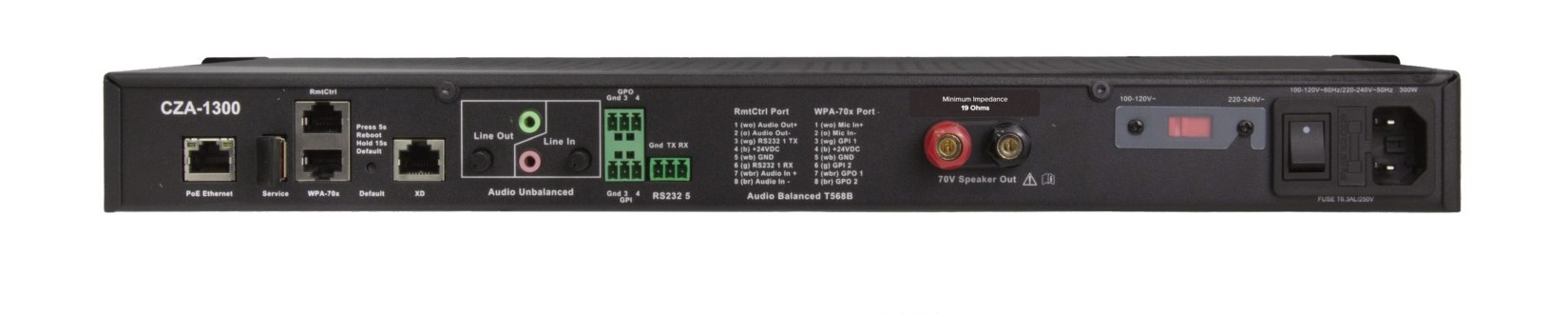
CZA-1300 rear panel: XD RJ45 (left of center) and the RS-232 Gnd/TX/RX Phoenix (right of the GPIO blocks).
4️⃣ Check the DIP switches
- AE's factory settings are right for most rooms. If one has been changed, set it back to these defaults:
| Switch | Name | Factory | What ON does |
|---|---|---|---|
| 1-1 | MIC Override | ON | Lowers Line In media while the teacher talks |
| 1-2 | Tone ON/OFF | ON | Beep on the mix/line out when mic volume buttons are pressed |
| 1-3 | Tone Level H-L | OFF (low) | Louder beep |
| 1-4 | MIC/Line Mix | ON | All three channels on the mixed line out (OFF = three separate outputs) |
| 1-5 | F/B Blocker | ON | Feedback blocker active |
| 1-6 | RMT VOL | OFF | Mic volume buttons control an external system instead |
| 1-7 | MIX OUT-ATN | ON | Mixed output 10 dB lower (OFF = 10 dB louder) |
| 1-8 | Tx Pwr Normal/Hi | OFF (normal) | Longer range for extra-large rooms |
| 2-1 | CH3 Vol Line/MIC | ON | Teacher mic controls the media channel volume |
- Leave Switch 1-6 (RMT VOL) off, or the teacher mic's volume buttons stop controlling the receiver.
- Switches are read at power-up. If you change one, power-cycle the amp.
5️⃣ Set it up in EPIC
- Settings › Devices › Known Devices, pencil icon on the MS-700-S or CZA-1300.
- Set Capabilities to XD Enabled. AE requires this so EPIC knows a receiver is connected.
- Fill in the XD Receiver ID and use Check Receiver ID. Turn on SAFE Badge Enabled if the room uses badges. Click Save.
- When all receivers are in, click Query All XD on Known Devices so SAFE alerts map to the right rooms (see QR-AE-012).
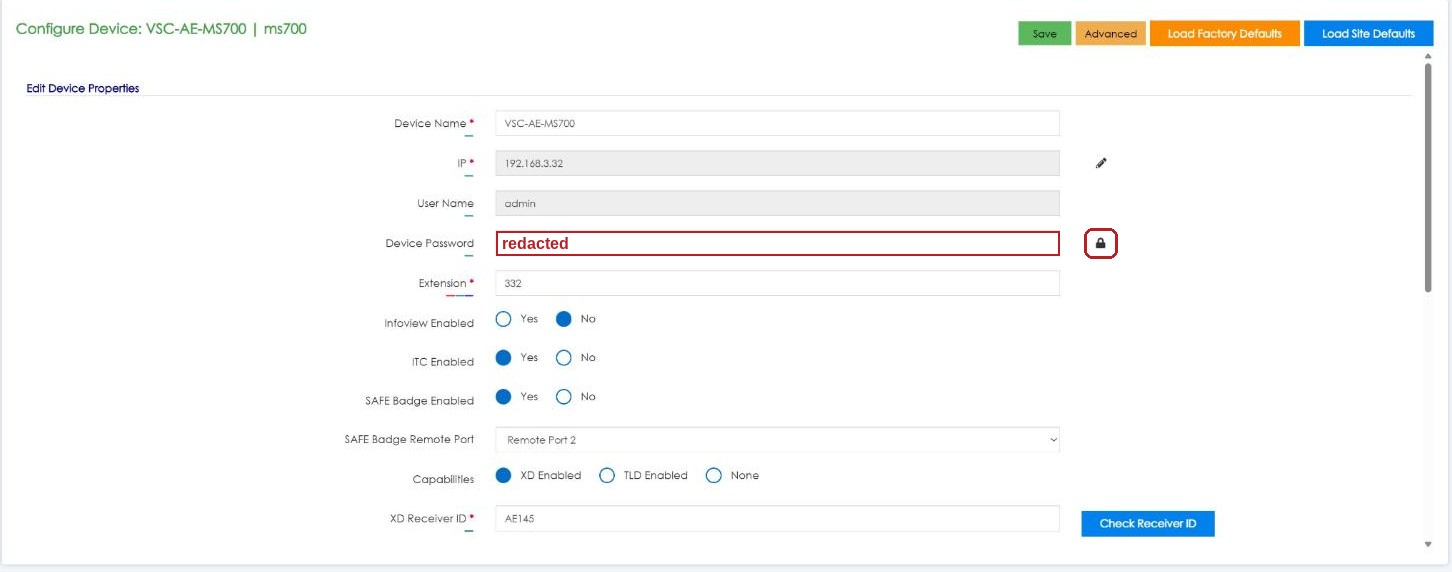
Configure Device: Capabilities = XD Enabled, XD Receiver ID and Check Receiver ID. Password redacted.
6️⃣ Link the mics and test
- Press Link on the receiver (it blinks yellow for 20 seconds) and link each mic with the mic off: teacher pendant, hold REC then press and hold PWR; student handheld, hold PWR LINK and slide TALK up; Mic360, power on and hold LINK 1 second. A beep confirms it (details in QR-AE-013).
- Audio: MIC 1 and MIC 2 LEDs turn green when a linked mic is on.
- Volume: the teacher mic's ▲ ▼ and SELECT change the levels. If they don't, the RS-232 link or DIP switch 1-6 is the problem.
- SAFE: with the office told first, hold both side buttons on the teacher mic for 3 seconds. The receiver's LEDs turn red and the alert must show in EPIC with the right room. Clear it the way the district's process says.
Field tips
- Mics work but no SAFE alert in EPIC? Check the RS-232 wiring (TX and RX crossed), Capabilities = XD Enabled, and run Query All XD.
- No audio at all? Check the Audio/Power RJ45 and that the amp's 24 V is up (receiver Power LED green).
- Power LED yellow? The receiver is getting a page-mute signal. That's normal during a page.
- Gym with heavy echo? Turn the room's EQ and level down in EPIC (Settings › Classroom Volumes, pick the amp) before blaming the receiver (QR-AE-011).
📚 Sources & credits
- Compiled by Brad Roy, VSC Director of Operations
- Audio Enhancement: MS-700-S Optimum Amplifier QSG DC-41151.1025 (XD Receiver port pinout, splitter cable, Capabilities in EPIC); CZA-1300 Amplifier Pinout DC-41216.1025 (XD port pinout); CZA-1300 Manual DC-41133.0525 and QSG DC-41049.0525 (RS-232 for SAFE System communications, rear panel)
- Audio Enhancement: XD Receiver Manual DC-41037.1223 (LEDs, DIP switches, RS-232C wiring and settings, SAFE alert behavior); XD Receiver Spec Sheet; XD Receiver Bracket IG DC-40762.0124
- Images: Audio Enhancement. EPIC screenshot: VSC's EPIC 3.2.5 demo server, 10/9/2026; nothing was saved.