Play Background Music with CLAUDIA
Quick Reference QR-AE-021 · Audio Enhancement EPIC · Rev 1.0 · Oct 2026
Stream music from the office CLAUDIA media station to the hallways, cafeteria or any room, and keep bells and pages on top.
📄 View or download this guide as a PDF
Click the PDF icon below to open it right here in your browser. In the viewer, use Download (top right) to save a copy, or the printer icon to print it.
CLAUDIA plugs into the network and broadcasts whatever it's playing. Every EPIC device with Background Music turned on picks it up. Music is the lowest priority audio in EPIC, so bells, pages, intercom and notifications cut in over it automatically and the music comes back after.
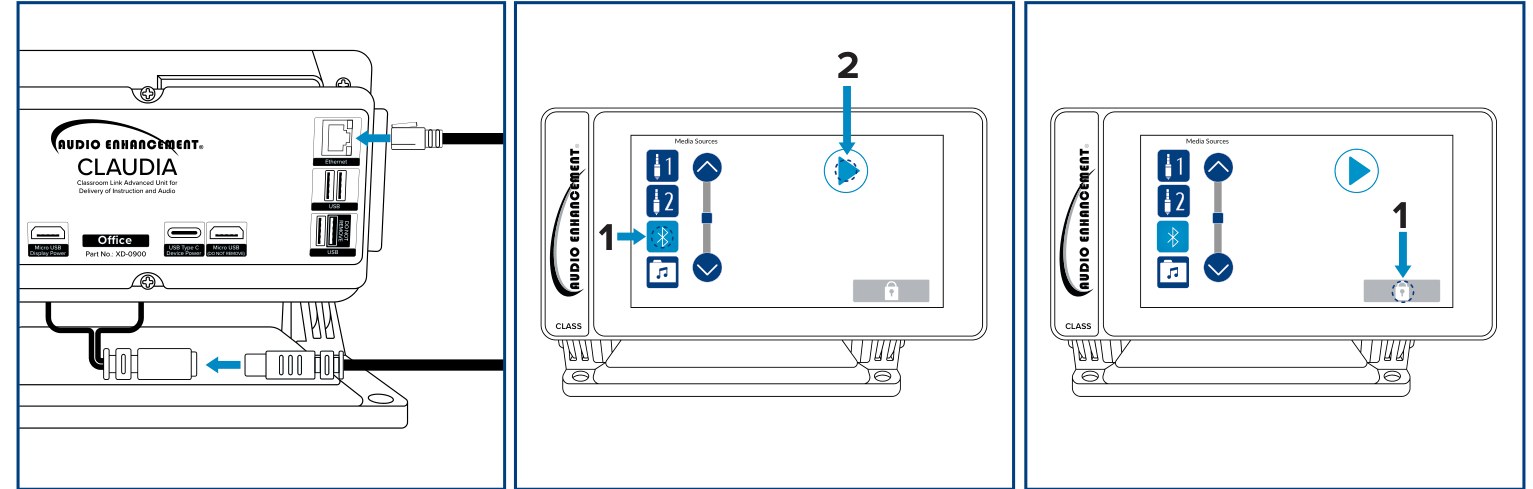
CLAUDIA: Ethernet and USB-C power on the back (left), pick a source and press Play (center), lock icon (right). AE DC-40937.01.
1️⃣ Connect CLAUDIA
- Plug in the Ethernet cable first (EPIC VLAN), then the supplied USB-C power supply.
- Connect the music source (or pick one on the screen), press Play. The button turns into Stop while it's streaming.
- Press the lock icon to lock the screen with a PIN so it can't be changed. Change the PIN from the factory default at install and give it only to the people who run the music.
2️⃣ Turn on Background Music on the devices that should play it
- In EPIC, go to Settings › Devices › Known Devices and click the pencil on a device (hallway amp, cafeteria CZA-1300, a classroom).
- Scroll to Background Music and set:
Setting Value Background Music Enabled On Background Music Volume 80% is the default. Set it per space. Background Music Buffer 600 ms (default). It smooths out skipping. Background Music IP (the stream URL) rtp://0.0.0.0:5555 - Click Save. To do many devices at once, use Configure at the top of Settings › Devices (master configuration, then push to the devices you pick).

Configure Device › Background Music on an MS-700 (VSC demo, EPIC 3.2.5).
3️⃣ Test it
- Press Play on CLAUDIA. Music plays in the enabled spaces within a few seconds.
- Send a short page to one of those zones. The music should drop out for the page and come back after.
Good to know
- 0.0.0.0 means "play any music stream on port 5555". To accept only one CLAUDIA, enter its IP instead, e.g.
rtp://10.20.30.40:5555. - The port (5555) can't be the same as the notification streaming port.
- Devices only play MPEG background-music streams. CLAUDIA sends the right format; other sources aren't supported by AE.
- A device's status page always shows 0.0.0.0:5555 as the background-music party, even when nothing is playing.
- Music isn't logged in EPIC, even in debug mode.
📚 Sources & credits
- Compiled by Brad Roy, VSC Director of Operations
- Audio Enhancement: CLAUDIA Classroom Media Station QSG DC-40937.01 (connections, streaming, lock); EPIC Background Music Streaming DC-40850.01 (priority, volume, buffer, listening IP and port, MPEG only); Suppress Bells and Other Events During an Emergency Event DC-41226.1025 (CLAUDIA not affected)
- AE's background-music guides predate EPIC 3.x; settings and the
rtp://0.0.0.0:5555stream address were checked on VSC's EPIC 3.2.5 demo server, 10/9/2026. Images: Audio Enhancement; EPIC screenshot: VSC demo, nothing saved.