AE1 and Lighthouse: What They Are and How to Network Them
Quick Reference QR-AE-033 · Audio Enhancement EPIC · Rev 1.2 · Oct 2026
An overview of Audio Enhancement's new cloud-connected AE1 platform and the Lighthouse district dashboard, who uses them, the firewall and port rules they need, and how to name appliances.
📄 View or download this guide as a PDF
Click the PDF icon below to open it right here in your browser. In the viewer, use Download (top right) to save a copy, or the printer icon to print it.
AE1 and Lighthouse are new from Audio Enhancement (AE's documents are dated September 2026). The school's on-site server, which AE used to call the EPIC server, is now the AE1 Gateway. It still runs the building's MSx devices, kiosks, InfoView displays and cameras on the local network, and it also keeps an outbound connection to AE's cloud, the AE1 Platform. This guide covers what district IT needs to allow so that connection works. AE hasn't published step-by-step setup instructions yet, so ask your VSC Project Coordinator about setup.
| Name | What it is |
|---|---|
| AE1 Platform | AE's cloud service. Staff reach it from a web browser, the mobile app or the desktop apps. It sends commands, configuration changes and software updates to each gateway and receives status, health and logs back. |
| AE1 Gateway | The on-site server at each school (formerly the EPIC server). It talks to the local devices and connects out to the AE1 Platform. No inbound connection from the internet is needed. |
| Lighthouse | A district dashboard built on AE1. It shows every connected appliance in the district in one place, monitors system health so problems can be caught before they reach a classroom, and tracks usage and performance across schools. |
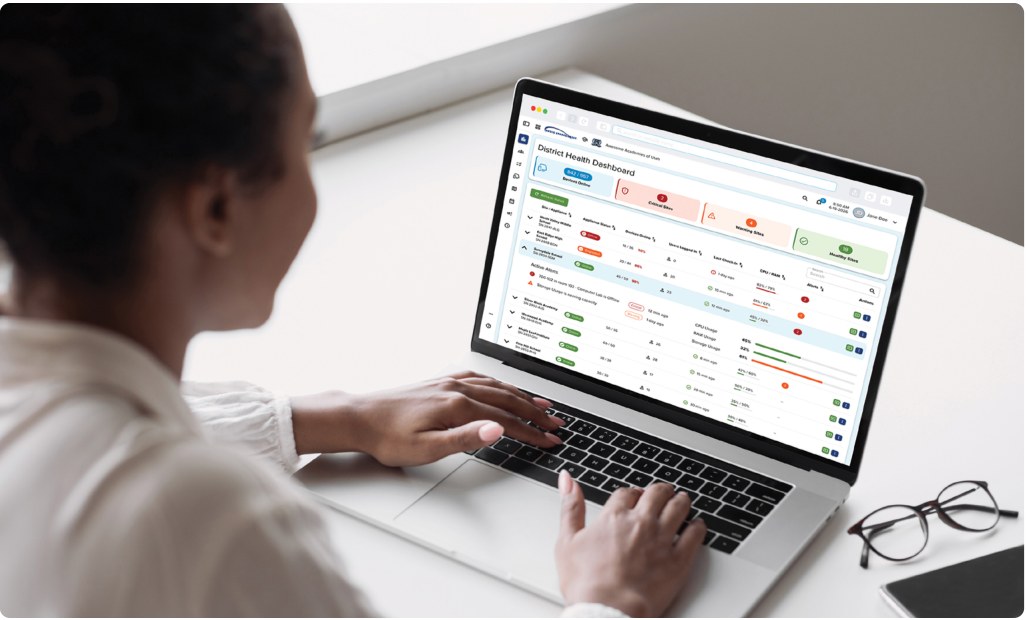
Lighthouse District Health Dashboard: critical, warning and healthy sites, with per-school alerts. Audio Enhancement.
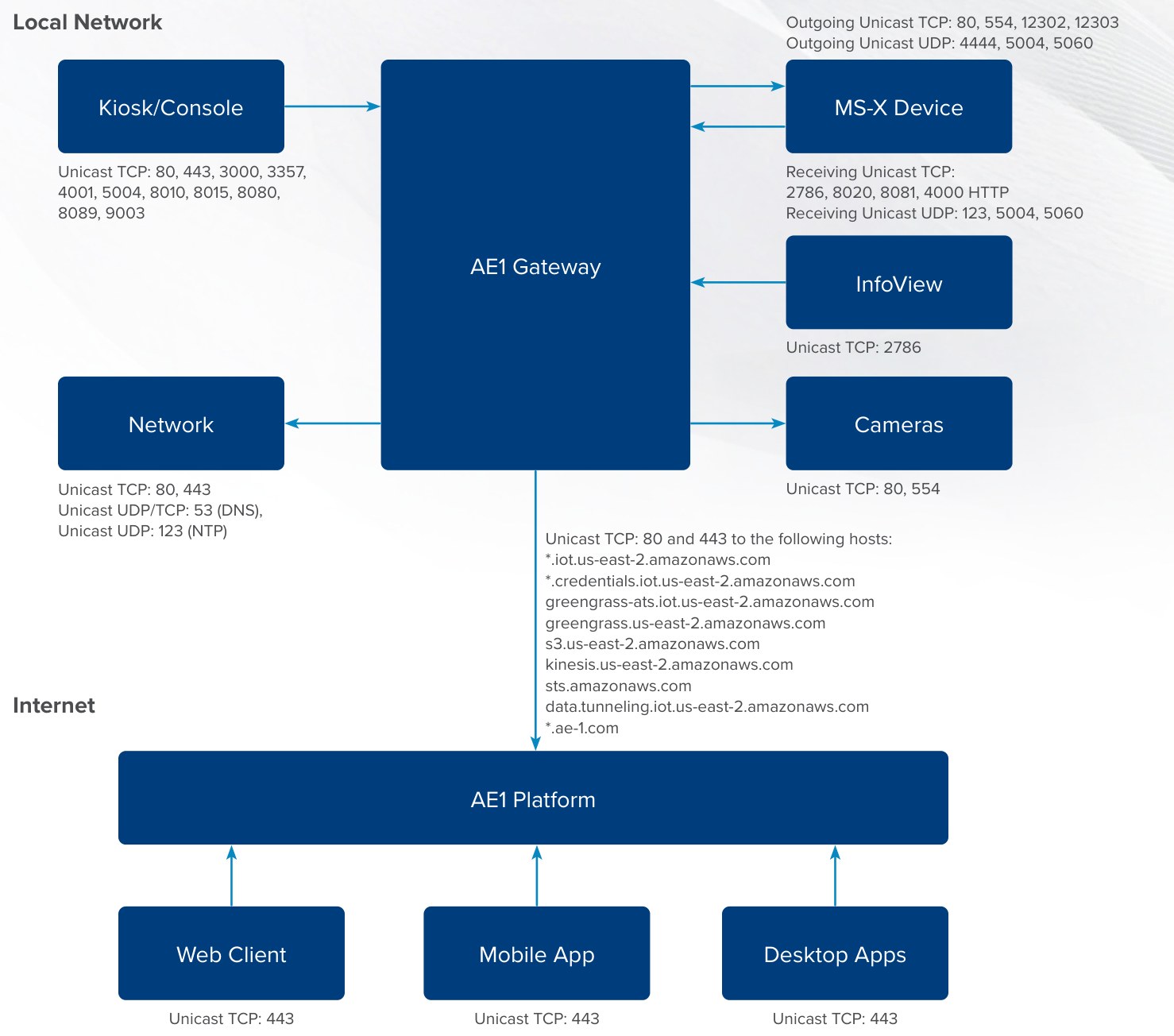
How AE1 traffic flows: local devices to the AE1 Gateway, the gateway out to the AE1 Platform, and users to the platform on TCP 443. Audio Enhancement, DC-41300.0926.
1️⃣ Let staff reach the AE1 Platform
Allowlist these on the staff (and any student) machines that will use the AE1 web, mobile or desktop apps, and from the AE1 Gateway. AE recommends both HTTP (80) and HTTPS (443).
| Domains | Ports |
|---|---|
| ae-1.com · *.ae-1.com audioenhancementplus.com · *.audioenhancementplus.com audioenhancement.com · *.audioenhancement.com | TCP 80 and 443 |
2️⃣ Let the AE1 Gateway reach the cloud
Only the gateway needs these. HTTPS 443 unless noted.
| Host | What it's for |
|---|---|
| *.iot.us-east-2.amazonaws.com | Main connection to the AE1 Platform: commands, status and configuration changes |
| *.credentials.iot.us-east-2.amazonaws.com | Credentials the gateway uses to sign in to the platform |
| greengrass-ats.iot.us-east-2.amazonaws.com | Software and configuration updates to the gateway |
| greengrass.us-east-2.amazonaws.com | Lets the platform manage and monitor the gateway's software |
| *.s3.us-east-2.amazonaws.com | Downloads AE1 update packages (see the note below) |
| s3.amazonaws.com | Update and storage requests. This exact host only, not a wildcard. |
| kinesis.us-east-2.amazonaws.com | Sends health, diagnostics and logs to the AE1 Platform and Lighthouse |
| sts.amazonaws.com | Renews the gateway's secure session |
| data.tunneling.iot.us-east-2.amazonaws.com | Remote support sessions, started from the gateway only when the customer asks for help |
| packages.ae-1.com | Installs components AE1 needs. Allow TCP 80 and 443. |
| DNS and NTP | UDP/TCP 53 and UDP 123. Usually internal district servers; if the gateway uses public DNS or NTP, allow those too. |
- No wildcard rules on your firewall? Use the base domain.
- You may need a host exclusion for the gateway in your firewall or web filter so it stays connected to the AE1 Platform.
3️⃣ Inside the network (same as EPIC)
Allow these between VLANs or through any internal firewall. They match EPIC's.
| From › To | Allow |
|---|---|
| Gateway › devices | TCP 80, 554, 12302, 12303 · UDP 4444, 5004, 5060 |
| Devices › gateway | TCP 2786, 4000, 8020, 8081 · UDP 123, 5004, 5060 |
| Kiosk › gateway | TCP 80, 443, 3000, 3357, 4001, 5004, 8010, 8015, 8080, 8089, 9003 |
| InfoView › gateway | TCP 2786 |
| Gateway › cameras | TCP 80, 554 |
| Audio (RTP) | UDP 10000–20000 between gateways, their devices and any integrated VoIP phones |
VIEWpath (classroom video): the gateway and staff PCs reach viewpath.audioenhancement.com and the district's own [district]-district-storage.s3.amazonaws.com bucket (your district's name shows in the VIEWpath address bar). Other amazonaws.com hosts may be used; watch for blocked traffic.
4️⃣ Name each appliance in Lighthouse
When an appliance is added to Lighthouse it can get a friendly name instead of its ID or serial number. Use this pattern, with each word capitalized:
| What | Pattern | Example |
|---|---|---|
| Appliance name | <State>, <District>, <School> | UT, Jordan SD, Riverton HS |
| Serial number virtual (VM) installs only | <State>-<District>-<School>-VM, no spaces | UT-JordanSD-RivertonHS-VM |
| Write this | As |
|---|---|
| State or province | Two-letter postal code: MI, MA, NE, NB |
| School District · Public Schools | SD (Clark County SD) · PS (Jefferson County PS) |
| High School · Junior High · Middle School · Elementary · K–8th · K–12th · Pre-K | HS · JHS · MS · ES · K-8 · K-12 · Pre-K |
5️⃣ Who logs in, and give VSC access
| Who | Uses it for |
|---|---|
| District IT | AE1 and Lighthouse setup, gateways, users and network rules (steps 1 to 4). |
| Principals, education coordinators | Lighthouse usage metrics: how much teachers are using the mics and classroom audio, room by room and building by building. |
| Teachers and office staff | Not the audience. They keep using EPIC, the kiosk and the mics as before. |
Field tips
- Gateway missing or stale in Lighthouse? Check the iot, credentials and kinesis hosts aren't blocked, and that DNS and NTP work.
- Updates failing? Usually S3: check the bucket hosts, s3.amazonaws.com and packages.ae-1.com.
- Local paging, bells or intercom acting up? That's the internal ports (step 3), not the cloud.
- AE asks for a remote session? It only opens when you request support from the gateway.
📚 Sources & credits
- Compiled by Brad Roy, VSC Director of Operations
- Audio Enhancement: AE1 Network Configuration Guidelines DC-41300.0926 (AE1 and VIEWpath hosts, internal ports, network diagram); AE1 Specific Network Configuration Guidelines DC-41305.0926 (cloud hosts; packages.ae-1.com on 80 and 443); AE1 Lighthouse Appliance Name and Serial Number Structure DC-41311.0926; Lighthouse Flyer DC-41271.0926
- Images: Audio Enhancement. This is a guideline. Every district network is different, and the district is responsible for its own security configuration.