Classroom Intercom Card
VSC Classroom Card CC-AE-003 · Audio Enhancement EPIC classroom call controls · Rev 1.1 · Oct 2026
A full-page (8.5 × 11 in), two-sided card to leave in every classroom after install. The front shows the five ways a room can be set up (mic only, CALL button, EMERGENCY button, CALL + EMERGENCY, or the ITC touch panel), in both the Decora wall plate (WPA-701 / 704 / 705 / 702) and access panel (WBA-601 / 604 / 605 / 602) styles, then how to call the office, answer the office and send a silent SAFE alert (the same alert as the teacher mic's side buttons), with paired and non-paired alerts explained. The back covers the ITC touch panel (custom in every school), lockdown check-in (telling the office the room is secure, from the ITC or the teacher mic's SELECT button) and quick fixes.
📄 View or download this guide as a PDF
Click the PDF icon below to open it right here in your browser. In the viewer, use Download (top right) to save a copy, or the printer icon to print it.
🎨 Branding it for a district
Same template as the other classroom and office cards: the top bar, accent color, logo and help line can match a district, and the red emergency band stays the same on every version. Send VSC Operations the district name, logo (PNG), colors and the help line staff should call. A sample in district colors is attached here.
👀 Preview
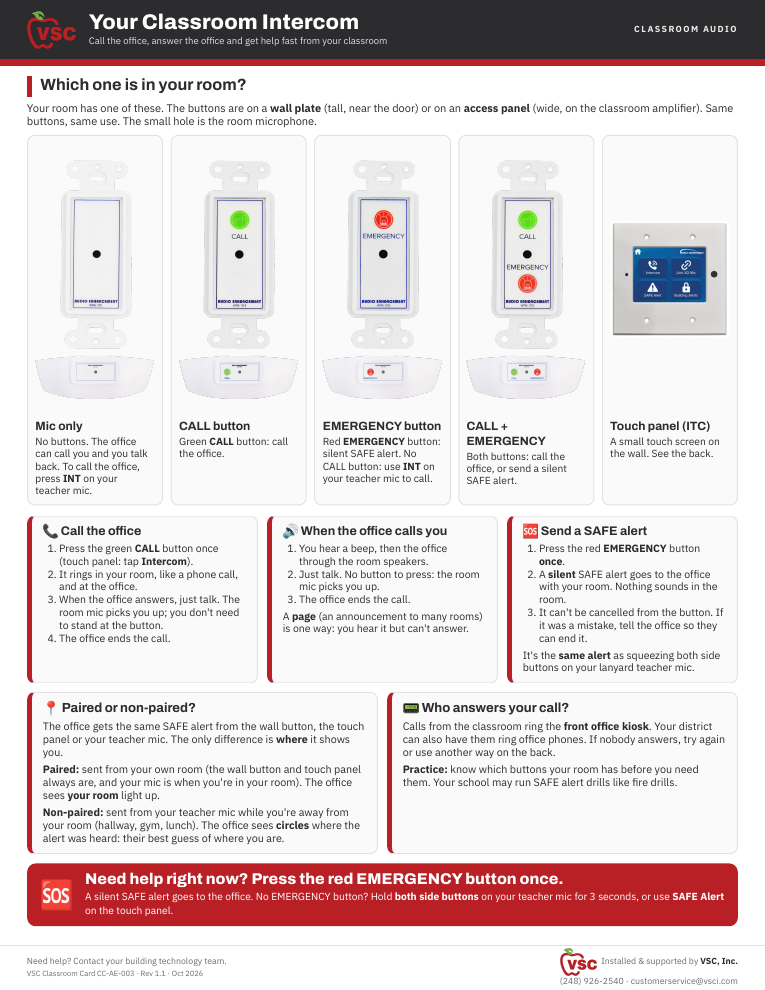
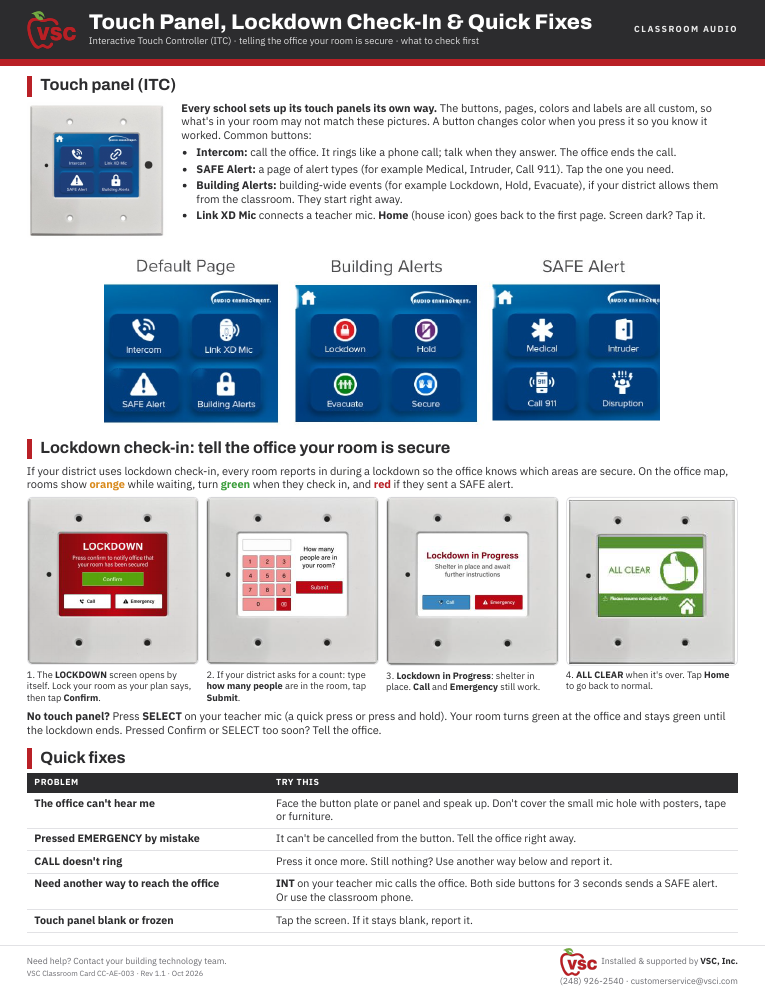
Front: which controls your room has, calling and answering the office, SAFE alert, paired vs non-paired. Back: ITC touch panel, lockdown check-in, quick fixes.
📚 Sources & credits
- Card design and field notes: Brad Roy, VSC Director of Operations (CALL rings the room and the kiosk like a phone call; EMERGENCY is one press, silent SAFE alert; incoming intercom is hands-free)
- Audio Enhancement spec sheets: WPA-701 DC-40972.1023, WPA-702 DC-40973.1023, WPA-704 DC-40974.1023, WPA-705 DC-40975.1023, WBA-601 DC-40984.1023, WBA-602 DC-40985.1023, WBA-604 DC-40986.1023, WBA-605 DC-40987.1023 (photos and button layouts); Interactive Touch Controller Spec Sheet DC-40961.0924 and EPIC ITC Implementation QSG DC-41272.0626 (ITC photo and example pages); Connect School VoIP Phones to EPIC System (call buttons ring the EPIC console by default; phones can be added); EPIC 2.5 Admin Manual DC-40654.0824, Confirm Room (Lockdown Check-in), pp. 97–102 (ITC lockdown screens and mic Confirm Room; Brad: still the same in EPIC 3.x). Paired / non-paired wording: Brad Roy.