Find a Device's Switch Port and VLAN with Wireshark
Quick Reference QR-GTS-003 · General Troubleshooting · Rev 1.0 · Oct 2026
Plug a laptop into the device's cable and read the switch name, port and VLAN in about a minute.
📄 View or download this guide as a PDF
Click the PDF icon below to open it right here in your browser. In the viewer, use Download (top right) to save a copy, or the printer icon to print it.
Why: wall jacks and patch panels often aren't labelled, so you can't tell which switch port a device is on. And a device on a working port but the wrong VLAN looks exactly like a dead device. Managed switches announce themselves on every port every 30 to 60 seconds. Wireshark reads that announcement and shows the switch name, the port and the VLAN, without logging in to the district's switch.
| You need | Notes |
|---|---|
| Laptop with Wireshark | Free from wireshark.org. Install the Npcap driver the installer offers. |
| Ethernet port | Built in, or a USB Ethernet adapter. |
| The VLAN it should be on | From the District Network Manager (district IT), or from a port you know is correct. Without it you can read the VLAN but can't say if it's right. |
1️⃣ Plug the device's cable into the laptop
- Unplug the patch cable from the device and plug it into the laptop. Now you're on exactly the switch port the device uses.
- Turn off the laptop's Wi-Fi (and any VPN) so you don't pick the wrong adapter.
2️⃣ Start a capture on Ethernet
Open Wireshark. Under Capture at the bottom of the welcome screen, double-click Ethernet. A USB adapter may be named "Ethernet 2" or similar.

The Capture list on the welcome screen: double-click Ethernet.
3️⃣ Filter to the switch's announcements
- In the green display-filter bar at the top, type lldp || cdp and press Enter.
- Wait up to a minute. The list starts empty: switches only announce every 30 to 60 seconds.

The filter typed in, with the capture running. The red square in the toolbar stops it (step 6).
4️⃣ Read the switch, port and VLAN
When a line shows up, click it and look in the details pane below. Some switches send only one of the two. Use whichever shows up.
| Line | Field | What it tells you |
|---|---|---|
| CDP (Destination CDP/VTP/DTP…) expand Cisco Discovery Protocol | Port ID | Switch and port. "Slot: 6, Port: 33" = switch 6 in the stack, port 33. |
| Native VLAN | The VLAN the port puts the device's traffic on (untagged). | |
| Device ID | The switch's ID. | |
| LLDP (Destination Nearest-Bridge) | System Name | The switch's name, often the closet (MDF, IDF). |
| System Description | Brand and model. | |
| Port ID | The port, often as slot:port (e.g. 6:33). If the switch sends it, an IEEE 802.1 section shows the Port VLAN ID. |

A CDP line: the Info column already shows the Port ID.
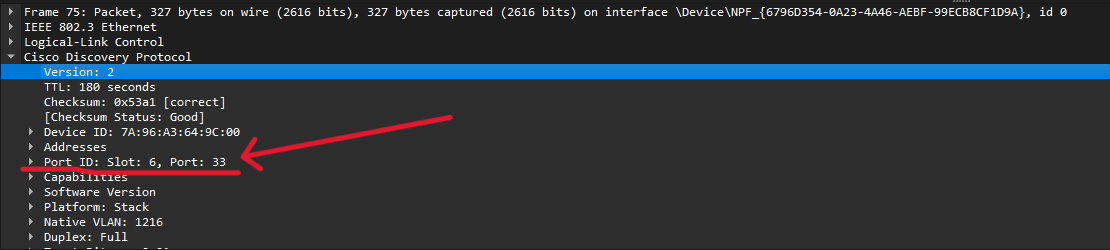
Cisco Discovery Protocol expanded: Port ID (Slot 6, Port 33) and Native VLAN further down.
5️⃣ Compare the VLAN
- Match: the port and VLAN are fine. Move on to IP, DHCP and the device's own settings (for AE: QR-AE-037 / QR-AE-038 step 4).
- No match: the port is on the wrong VLAN. Give the switch name, port and VLAN you found to the District Network Manager.
6️⃣ Stop, clean up, write it down
- Click the red square to stop the capture.
- Close Wireshark without saving: a capture can hold district traffic.
- Plug the patch cable back into the device.
- Record the switch name, port, VLAN found and VLAN expected on the Field Service worksheet (AE EPIC: VLAN confirmed plus Notes; other worksheets: Notes).
Tips and troubleshooting
- Nothing after a minute? Check the Ethernet link light, and that you double-clicked the right adapter.
- Still nothing? Some districts turn off CDP and LLDP on access ports. Ask district IT, or try a port swap with a working room.
- Two VLANs listed? A port with phones may also show a voice VLAN. Most AV gear doesn't tag, so it lands on the Native VLAN.
- Read only. Use Wireshark only to read the switch announcements. Don't leave a capture running.
📚 Sources & credits
- Method and screenshots: Jacob Freilich, VSC (Teams, 9/1/2026). Compiled by Brad Roy, VSC Director of Operations, with the Odoo Admin / Setup SOP draft (claude/sop-wireshark-switch-port-vlan.md, 10/15/2026).
- Screenshots are redacted: district switch names and local file paths are blurred.
- Wireshark is free, open-source software (wireshark.org). CDP is Cisco Discovery Protocol; LLDP is the IEEE 802.1AB Link Layer Discovery Protocol.